Accepting payments online should not be complicated. Whether you are a freelancer sending an invoice, a small business selling products, a charity collecting donations, or a creator accepting tips — PayPal is one of the most trusted and widely used payment platforms in the world.
But there is one question every PayPal user eventually asks: how do I create a direct payment link I can send to anyone?
The answer used to involve logging into your PayPal Business account, navigating through menus, filling out forms, and trying to remember where the “payment button” settings are buried. It was slow, confusing, and unnecessarily complicated.
etap’s free PayPal Link Generator solves this in seconds.
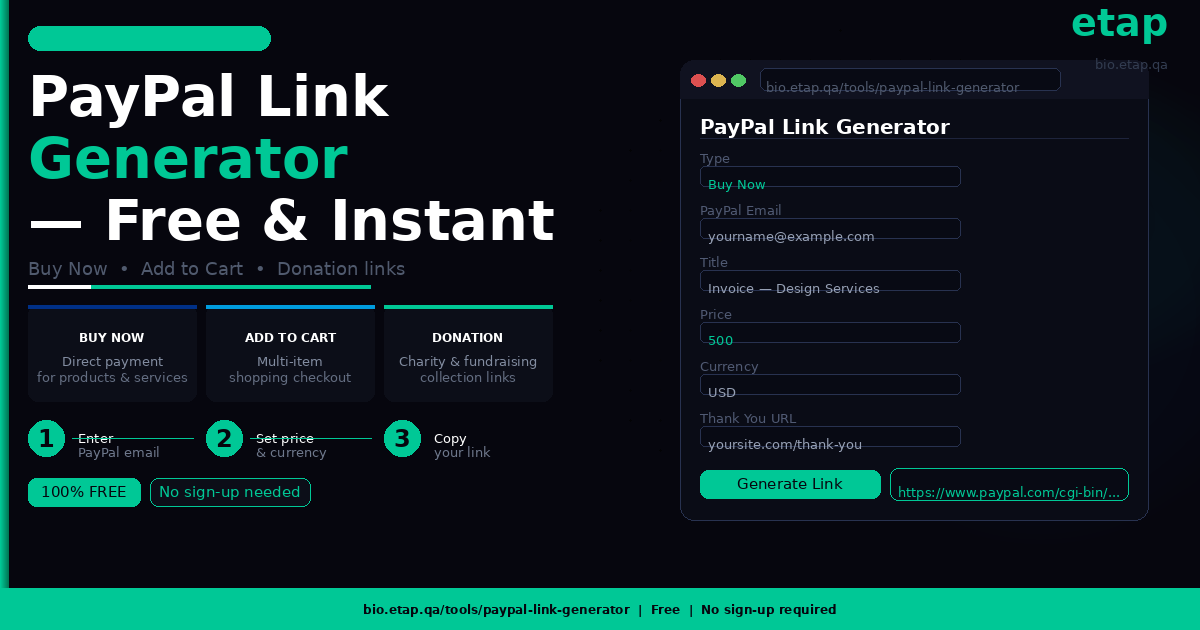
Visit bio.etap.qa/tools/paypal-link-generator — fill in a few fields — get your direct PayPal payment link instantly. No account needed on our side. No sign-up. No fees. Just a clean, functional payment link ready to send.
What Is a PayPal Payment Link?
A PayPal payment link is a unique URL that, when clicked, takes the recipient directly to a PayPal checkout page pre-filled with your payment details — your email address, the amount to pay, a description, and the currency.
Instead of asking someone to “send money to your PayPal email,” — which requires them to open PayPal, find the send money option, type your email, enter an amount, and add a note — you send them one link. They click it. PayPal opens with everything filled in. They pay in seconds.
PayPal payment links work on any device — desktop, phone, or tablet. The recipient does not need a PayPal account to pay in many cases (PayPal accepts card payments from non-members). And the link can be shared anywhere — WhatsApp, email, Instagram bio, website, invoice, or SMS.
What Types of PayPal Links Can You Generate?
etap’s PayPal Link Generator supports three types of payment links, each designed for a different use case:
1. Buy Now
The Buy Now link is the most direct payment option. When someone clicks a Buy Now PayPal link, they are taken straight to PayPal’s payment page for a specific product or service at a fixed price.
Best for:
- Freelancers sending a payment request to a client
- Selling a single product or digital download
- Charging a fixed service fee (consultation, design, repair)
- Requesting payment from a customer after completing work
Example: You are a graphic designer who has completed a logo project. You generate a Buy Now link for QAR 500 with the title “Logo Design — Project Invoice.” You send the link to your client via WhatsApp. They click, pay, done.
2. Add to Cart
The Add to Cart link allows customers to add a product to a PayPal cart before checking out. This is ideal when you have multiple products or want the customer to be able to purchase more than one item before paying.
Best for:
- Online sellers with multiple products
- Service providers with packages or bundles
- Anyone wanting a more traditional e-commerce checkout feel
- Sending payment links for different quantities of the same product
Example: You run a small online shop selling handmade accessories. You generate separate Add to Cart links for each item. A customer clicks multiple links, adds several items to their cart, and checks out in one payment.
3. Donation
The Donation link is specifically designed for collecting charitable or voluntary contributions. PayPal handles donation payments differently from commercial transactions — there are specific terms and tax considerations that vary by country. The Donation link type ensures the transaction is categorised correctly within PayPal’s system.
Best for:
- Charities and non-profit organisations
- Community fundraisers and campaigns
- Creators accepting tips or support from their audience
- Schools or sports clubs collecting contributions
- Event fundraising campaigns
Example: A community football club in Qatar is raising funds for new equipment. The treasurer generates a Donation PayPal link with the title “Al Rayyan FC Equipment Fund.” They post it in their WhatsApp group and on social media. Supporters click, donate, and a thank-you URL is shown after payment.
How to Use etap’s PayPal Link Generator — Step by Step
The tool is completely free and requires no account or registration on etap’s side. Here is how to use it:
Step 1 — Visit the tool. Go to bio.etap.qa/tools/paypal-link-generator
Step 2 — Select the payment type. Choose from Buy Now, Add to Cart, or Donation depending on your use case.
Step 3 — Enter your PayPal email address. This is the email address registered with your PayPal account — the address where you want to receive the payment.
Step 4 — Add a title. Give your payment link a descriptive title. This appears on the PayPal checkout page so the payer knows exactly what they are paying for. Examples: “Logo Design Invoice,” “Monthly Subscription Fee,” “Charity Donation — School Fund.”
Step 5 — Set the price. Enter the exact amount you want to collect. Leave it blank if you want the payer to choose their own amount (useful for donations and tips).
Step 6 — Select the currency code. Choose the currency for your payment — USD, QAR, EUR, GBP, AED, or any other currency supported by PayPal.
Step 7 — Add a Thank You URL (optional). Enter a URL that PayPal will redirect the payer to after a successful payment. Use this to show a custom thank-you page, a product download link, or a receipt page on your website.
Step 8 — Add a Cancel URL (optional) Enter a URL that PayPal will redirect to if the payer clicks cancel on the checkout page. Use this to send users back to your shop or product page rather than leaving them on a blank PayPal page.
Step 9 — Generate and copy your link. Click generate. Your PayPal payment link appears instantly. Copy it and share it anywhere — WhatsApp, email, Instagram, website, invoice, or text message.
8 Ways to Use Your PayPal Payment Link
Once you have generated your PayPal link, here are the most effective ways to share and use it:
WhatsApp — Paste the link directly into a WhatsApp chat or group. This is the most common way freelancers and small businesses in Qatar share payment requests. The link is clickable and opens PayPal immediately.
Email invoices — Include the PayPal payment link as a clickable button or hyperlink in your email invoice. Instead of asking a client to process a bank transfer, they click once and pay via PayPal in seconds.
Instagram and social media bio — Use a URL shortener (like bit.ly) to shorten your PayPal link, then add it to your Instagram, TikTok, or Twitter/X bio for fans, clients, or customers to access directly.
Your website — Embed the payment link as a button on your website’s pricing page, booking page, or product page. No payment gateway integration needed — just link a button to your PayPal URL.
QR code — Generate a QR code from your PayPal link using any free QR code tool. Print it on your business card, invoice, packaging, or display it at your counter. Customers scan to pay instantly.
etap NFC card or stand — If you use an etap NFC business card or digital profile (BioLink), you can add your PayPal payment link directly to your profile. When someone taps your card, your PayPal link is one tap away. This turns your eTap NFC card into a contactless payment tool.
Group chats and community fundraising — For donation links, share directly in WhatsApp groups, Telegram channels, or Facebook groups. Anyone in the group can click, donate, and support the cause in under a minute.
Printed materials — Include a shortened PayPal link or QR code on flyers, posters, menus, or receipts so customers can pay after the fact or contribute to a campaign.
Why Use etap’s PayPal Link Generator Instead of Doing It Manually?
PayPal does allow you to create payment buttons through your account dashboard, but the process involves multiple steps, requires a PayPal Business account, and the generated code is often designed for HTML embedding rather than simple link sharing.
etap’s PayPal Link Generator gives you a clean, shareable URL in seconds — no PayPal account settings to navigate, no HTML code to embed, no technical knowledge required. The tool generates a valid PayPal payment URL using PayPal’s standard payment parameters, meaning the link works the same as one created through PayPal’s own system.
It is also completely free with no strings attached. You do not need to create an account on etap’s platform to use the tool. Simply visit, fill in your details, generate, and go.
What Else Can You Do on bio.etap.qa?
The PayPal Link Generator is one of many free tools available on the etap BioLink platform at bio.etap.qa. The platform is designed to help professionals and businesses manage their complete digital identity in one place.
With an etap BioLink profile, you can create a smart digital profile page that holds all your contact details, social media links, website, portfolio, WhatsApp, and tools like your PayPal payment link — all accessible with one tap from your etap NFC business card or QR code.
When someone taps your eTap NFC card, they land on your complete BioLink profile. From there, they can save your contact, follow you on social media, visit your website, and — if you have added it — pay you via your PayPal link directly from the profile page.
It is the complete smart networking and payment solution for modern professionals and businesses in Qatar and beyond.
Explore all free tools at bio.etap.qa/tools Create your BioLink profile at bio.etap.qa Get your NFC business card at etap.qa
Frequently Asked Questions
Is the etap PayPal Link Generator free?
Yes, completely free. No account, no sign-up, and no fees required to generate PayPal payment links.
Does the recipient need a PayPal account to pay?
Not always. PayPal allows guests to pay using a debit or credit card without a PayPal account in many countries. However, some transaction types may require the payer to have or create a PayPal account.
What currencies does the PayPal Link Generator support?
The tool supports all currencies that PayPal accepts, including USD, EUR, GBP, QAR, AED, SAR, and many others. Enter the three-letter currency code (e.g., USD, EUR, QAR) in the currency field.
Can I leave the price field blank?
Yes. For donation links, leaving the price blank allows the payer to enter their own contribution amount — ideal for fundraisers, tips, and voluntary support.
Is this tool safe to use?
Yes. The tool generates a standard PayPal payment URL using your own PayPal email address. etap does not handle any payments, store your PayPal credentials, or access your PayPal account at any point. All payments go directly through PayPal’s secure platform.
Can I use the generated link more than once?
Yes. The generated PayPal link can be reused as many times as needed. Each time someone clicks the link, they are taken to the same PayPal checkout page with your pre-filled payment details.
What is the Thank You URL for?
It is an optional URL that PayPal redirects the payer to after a successful payment. You can use it to show a custom thank-you page, a download link, or a booking confirmation page on your own website.
Generate your free PayPal payment link now at bio.etap.qa/tools/paypal-link-generator — and if you want to share it instantly with every contact through a single tap, get your etap NFC business card at etap.qa.